 ComplyTime
Title here
Summary here
Compliance assessment at scale breaks down
Authority documents (NIST 800-53, CIS Benchmarks, organizational policies) must be translated into executable checks. When dozens of teams interpret the same requirement independently, meaning and rationale are lost. Learn more →
Different technology stacks require different assessment tools -- OpenSCAP for VMs, OPA for Kubernetes, platform-specific tooling for cloud. Each has its own policy language and data model. Nothing ties them together. Learn more →
Every assessment produces artifacts, but they land in different tools and formats. Tracing a finding back to the authority document it satisfies is manual reconstruction. Learn more →
ComplyTime is a compliance runtime. It pulls policies from OCI registries, dispatches assessments to provider plugins, and produces structured evidence mapped to the controls being assessed.
Key idea: Compliance content (what must be true) and assessment logic (how to verify it) have independent lifecycles. You can swap evaluators without rewriting content, and update content without modifying evaluators.
Platform engineers, compliance engineers, and DevSecOps teams who need machine-readable, control-mapped compliance evidence -- whether for internal audit, continuous monitoring, or regulatory frameworks like FedRAMP and FISMA.
ComplyTime adds value when you need to assess against multiple frameworks, use multiple evaluators, or produce structured evidence. If your needs are simpler, a single tool may be enough.
| If your situation is… | Consider instead |
|---|---|
| Single framework, single evaluator | Use OpenSCAP, Prowler, or Checkov directly. |
| Kubernetes-only policy enforcement | Use OPA Gatekeeper or Kyverno. |
| One-time audit, not continuous | A manual assessment with your existing tooling may suffice. |
ComplyTime spans two core domains Definition and Measurement integrated into your Software Development Lifecycle.
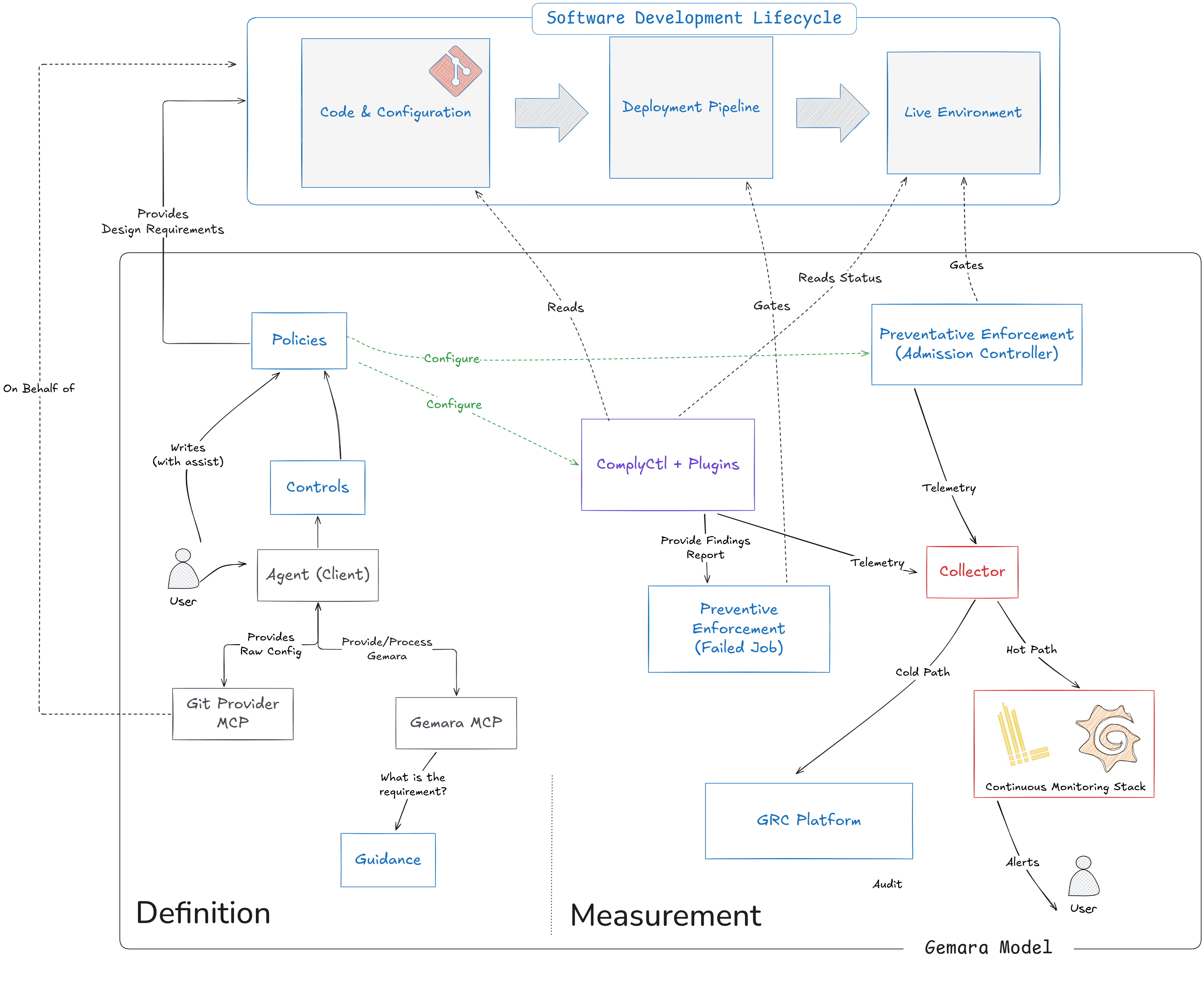
complyctl and its plugins read those policies, run assessments in the deployment pipeline, and feed findings to enforcement gates, a Collector, and downstream systems like GRC and Observability Platforms.Before you begin, ensure you have:
To build from source, you will also need:
The fastest way to get started is with complyctl, our command-line tool for compliance workflows.
Binary (recommended)
Download the latest release from the
complyctl releases page. Then verify the release signature using cosign:
cosign verify-blob \
  --certificate complyctl_*_checksums.txt.pem \
  --signature complyctl_*_checksums.txt.sig \
  complyctl_*_checksums.txt \
  --certificate-oidc-issuer=https://token.actions.githubusercontent.com \
  --certificate-identity=https://github.com/complytime/complyctl/.github/workflows/release.yml@refs/heads/main
Build from source
git clone https://github.com/complytime/complyctl.git
cd complyctl
make build
export PATH="$PWD/bin:$PATH"complyctl versionNote: ComplyTime uses two separate
.complytimedirectories with different scopes:~/.complytime/(under your home directory) is a global cache for providers and downloaded policies, while./.complytime/(in your current working directory) holds per-workspace state such ascomplytime.yamland scan output.
Scanning providers are standalone executables placed in ~/.complytime/providers/. The filename determines the evaluator ID (e.g. complyctl-provider-openscap).
Pre-built Linux binaries are available from the complytime-providers releases page. To build from source, see the complytime-providers README.
Install the provider:
mkdir -p ~/.complytime/providers
cp complyctl-provider-openscap ~/.complytime/providers/
For the OpenSCAP provider, also install the required system packages:
For other operating systems see the OpenSCAP Website
sudo dnf install -y openscap-scanner scap-security-guide1. Create a workspace config
Create complytime.yaml in your working directory. This example uses the
CIS Fedora L1 Server policy with the OpenSCAP provider:
policies:
  - url: quay.io/complytime/policies-cis-fedora-l1-server:latest
    id: cis-fedora-l1-server

targets:
  - id: my-server
    policies:
      - cis-fedora-l1-server
    variables:
      profile: cis_server_l1
The profile variable is required by the OpenSCAP provider — it selects which
SSG profile to evaluate. List available profiles on your system with:
oscap info /usr/share/xml/scap/ssg/content/ssg-fedora-ds.xmlIf the OpenSCAP provider cannot auto-detect the SCAP datastream for your distribution, set datastream explicitly:
    variables:
      profile: cis_server_l1
      datastream: /usr/share/xml/scap/ssg/content/ssg-cs10-ds.xml
See the OpenSCAP provider configuration for all target variables and available profiles.
Alternatively, run complyctl init for interactive workspace setup.
2. Fetch policies
complyctl getDownloads Gemara policies from the OCI registry into the local cache (~/.complytime/policies/). Uses Docker credential helpers — if docker login works, complyctl get works.
3. Verify the cache
complyctl list4. Generate assessment configuration
complyctl generate --policy-id cis-fedora-l1-server5. Run the scan
# EvaluationLog (default)
complyctl scan --policy-id cis-fedora-l1-server

# Markdown report
complyctl scan --policy-id cis-fedora-l1-server --format pretty

# OSCAL assessment-results
complyctl scan --policy-id cis-fedora-l1-server --format oscal

# SARIF
complyctl scan --policy-id cis-fedora-l1-server --format sarif
Output is written to ./.complytime/scan/.
What does the scan produce?
Each scan generates a compliance report mapping findings to the specific controls assessed.
An exit code of 0 means the scan completed successfully –
findings appear in the report, not as errors.
The default EvaluationLog format merges results from all providers into a single assessment.
OSCAL assessment-results can be fed directly to GRC platforms or auditors.
SARIF integrates with code analysis tools.
The Markdown format is human-readable and suitable for review.
6. Check workspace health (optional)
complyctl doctor
complyctl providers